
7 Best Monday.com Alternatives for Project Scheduling


7 Monday.com Alternatives Tested for Project Scheduling
Most teams don't leave monday.com because it's a bad tool. They leave because they tried to build a scheduling system inside a platform that was never designed to be one.
Monday.com excels at work coordination. Its automations are genuinely powerful, the ecosystem of integrations is deep, and for tracking tasks across departments, few platforms match its flexibility. But flexibility and scheduling precision are two different things. Teams running construction timelines, product launches with 40+ dependencies, or multi-phase client deliverables eventually discover a gap between what monday.com can do and what scheduling requires.
That gap shows up in specific places:
- Gantt charts feel decorative, not functional. Monday.com offers a timeline view, but dragging bars on a calendar isn't the same as calculating float, identifying slack, or auto-adjusting downstream tasks when a predecessor slips.
- Dependency management is surface-level. You can link tasks, but finish-to-start is about the extent of it. Start-to-start, finish-to-finish, and lag/lead time relationships (standard in scheduling) require workarounds or third-party add-ons.
- Critical path analysis doesn't exist natively. If you can't instantly see which sequence of tasks determines your project's minimum duration, you're guessing at what actually matters.
- Resource leveling is manual. Overallocated team members won't trigger warnings or automatic redistribution. You find out someone's double-booked when they miss a deadline.
The core distinction matters here: project management tracks what needs to happen. Project scheduling calculates when it can happen, given constraints. Timeline visualization, dependency chains, resource leveling, milestone tracking, and critical path analysis are the five pillars that separate a scheduling tool from a task tracker with a calendar view.
Common advice suggests that any PM tool with a Gantt chart can handle scheduling. That's misleading. A Gantt chart without dependency logic and critical path calculation is just a colorful bar chart. The scheduling power lives in the engine underneath, not the visual layer on top.
To find which tools actually deliver on scheduling, we tested seven alternatives through a scheduling-specific lens: YAPL, Asana, Smartsheet, Wrike, Trello, Airtable, and Basecamp. Instead of comparing generic feature lists (every tool has "task management" and "collaboration"), we evaluated each on Gantt depth, dependency types supported, critical path capability, milestone handling, and resource conflict detection.
The results were uneven. Some tools surprised us. Others confirmed what frustrated teams already suspect.
How We Evaluated Each Monday.com Competitor for Scheduling
Each tool was scored against six scheduling-specific criteria, weighted by impact on timeline accuracy, using a standardized 50-task test project.
Most comparison articles rank project management tools by counting integrations, rating dashboard aesthetics, or listing automation triggers. That approach fails teams whose primary need is scheduling precision. A tool can have 200 integrations and still lack the ability to define a start-to-start dependency between two parallel tasks. So we built an evaluation framework focused entirely on what scheduling-dependent teams actually need.
The conventional wisdom is to pick a project management tool based on overall feature breadth. Teams with complex timelines should evaluate scheduling depth first, because a tool that scores well on collaboration but poorly on dependency logic will cost you weeks of manual rework on any project with more than 20 linked tasks.
Here are the six criteria we scored, each weighted by how directly it affects schedule reliability:
| Criteria | Weight | High Score (4-5) | Low Score (1-2) |
|---|---|---|---|
| Gantt chart quality and interactivity | 20% | Drag-and-drop bars with auto-recalculation of downstream dates | Static or view-only timeline with no inline editing |
| Dependency management (FS, SS, FF, SF) | 25% | All four dependency types supported with lag/lead time options | Only finish-to-start, or dependencies limited to same project |
| Critical path method support | 15% | Auto-calculated critical path with visual highlighting and slack time display | No critical path identification at all |
| Milestone tracking | 10% | Dedicated milestone markers on timeline with date alerts and rollup views | Milestones treated as regular tasks with no visual distinction |
| Resource allocation and workload balancing | 20% | Per-person capacity views, overallocation warnings, rebalancing suggestions | No resource view, or headcount-only without hours tracking |
| Free plan scheduling capabilities | 10% | Gantt views and basic dependencies available on free tier | Scheduling features locked behind paid plans entirely |
Dependency management carries the heaviest weight at 25% for a specific reason. Projects with finish-to-start-only logic can't model real-world overlap. Software teams running parallel QA alongside late-stage development need start-to-start dependencies. Construction crews pouring foundations while excavation finishes nearby need finish-to-finish. Without all four types, the schedule lies to you.
Each tool was tested using an identical 50-task project that included four dependency chains (ranging from 3 to 12 linked tasks), three deliberate resource conflicts where the same team member was assigned overlapping work, and five milestones spread across the project timeline. This setup mirrors the complexity of a mid-size product launch or a 10-week construction phase.
We tracked specific behaviors during testing:
- Whether moving one task automatically cascaded date changes through its dependency chain
- How each tool surfaced resource conflicts (proactive warning vs. silent overallocation)
- Whether the critical path updated dynamically when task durations changed
- How the free plan restricted scheduling features compared to paid tiers
Scoring was binary where possible. A tool either supports finish-to-finish dependencies or it doesn't. For qualitative criteria like Gantt interactivity, we scored based on the number of actions achievable without leaving the timeline view. Clicking into a separate modal to adjust a date dropped the score. Drag-and-drop with instant recalculation raised it.
This framework deliberately ignores features like form builders, CRM integrations, and time tracking dashboards. Those matter for overall work management, but they don't tell you whether a tool can answer the one question scheduling teams ask daily: "If this task slips by three days, what else moves?"
What the Side-by-Side Comparison Reveals
Of the seven tools tested, only three support critical path analysis natively, and most free plans strip out Gantt charts and dependency tracking entirely.

Raw feature lists can mislead. A tool might advertise "Gantt chart support" but require a paid add-on or third-party integration to actually render one. Similarly, "dependency management" sometimes means nothing more than simple finish-to-start links, which falls apart the moment you need start-to-start or finish-to-finish relationships for parallel workstreams.
The table below captures what each tool actually delivers out of the box, based on the six scheduling criteria from our evaluation framework. For a detailed interactive filter of these scheduling capabilities, see our interactive comparison of project management alternatives.
| Tool | Starting Price (per user/mo) | Free Plan | Gantt Charts | Dependency Types | Critical Path | Resource Allocation | Milestone Tracking | Best Suited For |
|---|---|---|---|---|---|---|---|---|
| Asana | $10.99 | Yes (no Gantt) | Native (paid plans) | FS, SS, FF, SF | Yes (paid plans) | Workload view (paid plans) | Yes | Cross-functional teams with complex task networks |
| ClickUp | $7.00 | Yes (limited Gantt) | Native | FS, SS, FF, SF | Yes (paid plans) | Workload view (paid plans) | Yes | Feature-heavy teams wanting scheduling + task management |
| Smartsheet | $9.00 | No | Native | FS, SS, FF, SF | Yes | Resource management add-on | Yes | Spreadsheet-oriented teams running construction or engineering schedules |
| Trello | $5.00 | Yes (no Gantt) | Add-on only | FS only (via Power-Up) | No | No | Via labels only | Small teams needing Kanban with light scheduling |
| Airtable | $20.00 | Yes (no Gantt) | Add-on/extension | FS only (limited) | No | No native feature | Via field configuration | Database-driven teams tracking project metadata |
| Teamwork | $10.99 | Yes (limited) | Native | FS, SS, FF, SF | No | Workload tracking | Yes | Client-facing agencies managing multiple project timelines |
| YAPL | $5.00 | Yes (with Gantt) | Native | FS, SS, FF, SF | Yes | Built-in | Yes | Teams prioritizing scheduling precision and critical path analysis |
Starting prices reflect the lowest monthly rate per user. YAPL uses a team-sized bucket model ($15/mo for up to 3 users) which significantly lowers the per-user cost compared to traditional per-seat platforms.
Three patterns emerge immediately.
Native Gantt isn't the norm on free plans. Trello, Airtable, and Asana all offer free tiers, but none include Gantt functionality without upgrading or installing third-party extensions. ClickUp's free plan technically includes a Gantt view, though it restricts the number of uses and strips dependency automation. If your team needs to visualize task sequences on a timeline without paying, the options narrow fast.
Full dependency support separates scheduling tools from task trackers. Only five of the seven tools handle all four dependency types (finish-to-start, start-to-start, finish-to-finish, start-to-finish). Trello's Power-Up approach limits you to finish-to-start links. Airtable's dependency handling requires workarounds through linked records and scripting. Teams running parallel workstreams, such as design starting before copy is finalized, or QA beginning while development wraps the final module, need at minimum start-to-start and finish-to-finish relationships to model reality accurately.
Critical path support remains rare. Only Asana (on paid plans), ClickUp (on paid plans), and Smartsheet offer critical path method calculations. YAPL includes it across all tiers. That's three, maybe four tools out of seven. The rest require you to manually identify your longest dependency chain, which becomes impractical once a project exceeds 30 or 40 linked tasks.
The smarter move is picking the tool whose native capabilities match your scheduling complexity without requiring add-ons. YAPL's starting price covers team-sized buckets rather than per-seat costs: the Basic tier is $15/month for up to 3 users ($5/user), while the Professional tier provides advanced features for 10 users at $69/month (effectively $6.90/user). This model includes native critical path analysis across all tiers, saving significant time compared to platforms where scheduling essentials are locked behind expensive enterprise upgrades.
If you want to compare project management alternatives across these scheduling dimensions interactively, that's a faster way to filter by the criteria that matter to your team's workflow.
Which Tools Excel at Gantt Charts, Dependencies, and Critical Path?
YAPL, Smartsheet, and Wrike scored highest for Gantt charts, dependencies, and critical path analysis, while Asana's timeline view suits lighter scheduling needs.
Scoring well on a comparison table and actually performing under real scheduling pressure are different things. A tool can check the "Gantt chart" box but collapse when a project manager needs to model four dependency types across 200 linked tasks. Here's where the top four tools landed after hands-on testing with our 50-task benchmark project.
YAPL: Enterprise Power Without the Enterprise Markup
YAPL was purpose-built for scheduling rather than adapted from a general work management platform. That distinction shows up immediately. It supports all four dependency types natively (finish-to-start, start-to-start, finish-to-finish, and start-to-finish), which matters the moment you're coordinating overlapping phases rather than simple sequential task chains.

Critical path analysis runs automatically as you build the schedule, highlighting the longest sequence of dependent tasks that determines your project's minimum duration. Work breakdown structure (WBS) support lets teams decompose deliverables into hierarchical task groups without losing visibility into how those groups interact.
Two capabilities stood out during testing:
- Resource allocation with workload balancing recalculates task assignments when you shift a milestone, flagging over-allocated team members before the conflict cascades through downstream tasks
- Local-first architecture means the Gantt chart renders and updates offline, syncing changes when connectivity returns. For construction site managers or field teams with spotty internet, this isn't a convenience feature; it's a requirement
If you're new to scheduling with Gantt views, YAPL's interface is a practical starting point for learning how Gantt charts structure project timelines before layering in dependencies and critical path tracking.
Smartsheet: The Spreadsheet Team's Scheduling Upgrade
Teams already working in Excel or Google Sheets tend to adopt Smartsheet faster than any other tool on this list. The interface feels familiar: rows, columns, cell formulas. But underneath that spreadsheet skin sits a capable Gantt engine with solid dependency management.
Conventional wisdom says to avoid spreadsheet-based tools for serious scheduling. Smartsheet's approach actually works well precisely because it reduces the learning curve for teams who already think in rows and formulas. The friction isn't in the tool; it's in the transition cost.
One significant caveat: critical path visualization requires the Business plan ($24/user/month as of early 2025), and resource management sits behind an additional premium tier. A 30-person team running a product launch discovered this mid-project when they needed to identify their critical path and had to upgrade plans to access the feature. Budget accordingly.
Wrike: Feature-Rich, Potentially Overwhelming
Wrike's Gantt charts are genuinely robust. Drag-and-drop dependency creation is smooth, the timeline reschedules automatically when you adjust predecessor tasks, and the resource workload views give managers a clear picture of team capacity.

Critical path is available on the Professional plan. The feature set is deep:
- Cross-project dependencies that link tasks across separate project plans
- Effort-based scheduling that distinguishes between task duration and actual work hours
- Custom workflows layered on top of the Gantt view for approval gates
The trade-off is density. Wrike packs so many features into its interface that teams under 15 people frequently report spending more time configuring the tool than using it. For enterprise PMOs managing portfolios of interconnected projects, that configuration investment pays off. For a 10-person marketing team scheduling a campaign launch, it's overkill.
Asana: Clean but Limited for Scheduling
Asana's Timeline view looks like a Gantt chart, but it isn't one, at least not in the traditional scheduling sense. Dependencies are limited to finish-to-start relationships only, which means you can't model tasks that need to start simultaneously or define lag and lead times between activities.
Asana is strongest as a task management and collaboration platform. Teams that primarily need to assign work, track progress, and manage workflows will find it excellent. Teams that need to calculate critical paths or manage four dependency types will hit a ceiling quickly.
There's no native critical path analysis. Resource workload views require the Business tier. For lightweight scheduling (a content calendar, a simple product roadmap), Asana performs well. But the moment a project has 50+ tasks with complex interdependencies, the Timeline view becomes a visualization tool rather than a scheduling engine.
The pattern across all four tools is consistent: the more a platform was designed specifically for scheduling rather than adapted from general project management, the fewer workarounds teams needed to model real-world project complexity.
How Budget-Friendly and Free Alternatives Compare
Most free plans strip out Gantt charts, dependencies, and timeline views entirely, making truly free project scheduling with linked tasks nearly impossible across all seven tools tested.
Trello, Airtable, and Basecamp consistently appear on "best free alternatives" lists, but those recommendations almost always evaluate general project management, not scheduling. When you filter specifically for Gantt support, dependency tracking, and critical path analysis, the free tier story changes dramatically.
Trello is a Kanban board. There's no native Gantt chart, no built-in dependency logic, and no timeline view on any plan. You can bolt on scheduling features through Power-Ups like TeamGantt or Placker, but those third-party add-ons carry their own subscription costs (typically $5-$10/user/month on top of Trello). The free plan is genuinely generous for task tracking: unlimited cards, up to 10 boards per workspace, and basic automation. But calling Trello a scheduling tool is like calling a spreadsheet a database. It can approximate the function, poorly.
Airtable offers more flexibility through its database-first architecture. You can build a timeline view that resembles a Gantt chart, and the relational data model handles complex project structures well. The catch: timeline view isn't available on the free plan at all. Free accounts cap at 1,000 records per base and exclude the views that make scheduling possible. Even on paid tiers, dependency management is limited to simple linked records rather than true finish-to-start or start-to-start relationships with lag time.
Basecamp takes a deliberately different approach. No Gantt charts, no dependencies, no timeline view. The tool focuses on team communication, file sharing, and to-do lists. For teams whose "scheduling" means assigning tasks with due dates and checking in via message boards, Basecamp works fine. For anyone managing overlapping task sequences where a delay in Task A pushes Tasks B through F, it's fundamentally the wrong tool.
One thing worth noting: Basecamp's flat $299/month pricing for unlimited users sounds appealing until you realize you're paying for communication features while still needing a separate scheduling tool.
Here's how free plan scheduling capabilities break down across all seven tools tested:
| Tool | Free Gantt Chart | Free Dependencies | Free Timeline View | Free Critical Path | Paid Tier for Scheduling Features |
|---|---|---|---|---|---|
| Trello | No (Power-Up only) | No (Power-Up only) | No | No | ~$10/user/mo + add-on costs |
| Airtable | No | No | No | No | $20/user/mo (Team plan) |
| Basecamp | No | No | No | No | Not available on any plan |
| Asana | No | Paid only | Paid only | No | $10.99/user/mo (Starter) |
| ClickUp | Yes (limited) | Yes | Yes | No | $7/user/mo (Unlimited) |
| Smartsheet | No | Paid only | Paid only | Paid only | $9/user/mo (Pro) |
| Wrike | No | Paid only | Paid only | Paid only | $9.80/user/mo (Team) |
Conventional advice says to start with a free plan and upgrade later. That approach backfires for scheduling because migrating a project with 50+ dependency chains between platforms often means rebuilding the entire schedule from scratch. Teams end up spending more time on the migration than they saved during the free trial period.
ClickUp's free plan comes closest to usable scheduling, offering basic Gantt views and simple dependencies without payment. Every other tool locks scheduling-critical features behind $7-$20/user/month tiers. For a 15-person team, that's $105-$300 monthly before you've configured a single task.
When Should You Actually Stay with Monday.com?
Not every team needs a scheduling-focused tool. Teams whose work centers on task management, automations, and cross-department workflows often get more value from staying put.
Switching tools costs time, disrupts habits, and burns through onboarding goodwill. Before committing to a migration, run an honest audit of how your team actually uses project management software. The answer might surprise you.
Stay where you are if your work fits these patterns:
- Your projects are task-oriented, not schedule-driven. Marketing campaigns, content calendars, and sprint boards rarely need critical path analysis. If your team tracks "who does what by when" without worrying about dependency chains, a work operating system covers that well.
- You depend on 200+ native integrations. Teams running Salesforce syncs, HubSpot automations, and Slack notifications from a single hub would lose significant workflow infrastructure by switching. Rebuilding those connections in a scheduling-focused tool takes weeks.
- Your organization uses one platform across sales, marketing, operations, and HR. Consolidation has real value. A single license covering CRM pipelines, creative requests, and IT ticketing reduces vendor sprawl and simplifies admin.
- Workflow automations drive your processes. If your team has built dozens of "when status changes to X, notify Y and move to group Z" rules, those automations represent institutional knowledge that doesn't transfer cleanly.
Make the switch if these frustrations sound familiar:
- You manage projects with complex dependency chains where a delay on Task 12 cascades through 30 downstream tasks, and you can't visualize that cascade natively.
- Your industry requires critical path analysis. Construction schedulers, engineering firms, and event production companies need to identify the longest sequence of dependent tasks to protect deadlines. General-purpose tools don't calculate this.
- You find yourself exporting data to Microsoft Project or Excel to build proper schedules, then manually updating two systems. That double-handling is a sign your tool isn't built for your problem.
- Resource leveling across multiple simultaneous projects matters to your team, and you need to see who's overallocated before commitments are made, not after.
A work operating system organizes tasks and automates business workflows. A project scheduling platform models time, dependencies, and resource constraints. These solve fundamentally different problems, and choosing the wrong category creates friction no amount of customization fixes.
For teams sitting on the fence, a detailed YAPL vs Monday.com comparison can clarify exactly where each approach breaks down. The clearest signal is simpler than any feature comparison: if your team talks about "tasks," stay. If they talk about "schedules," "float," and "predecessors," move.
Which Alternative Fits Your Industry's Scheduling Needs?
Construction, software, marketing, and event teams each need different scheduling capabilities, making industry context the most reliable filter for choosing the right tool.
A construction project manager juggling 300 tasks with strict sequential dependencies has almost nothing in common with a marketing director coordinating five simultaneous campaign launches. Yet most "best alternative" lists treat every team identically. Matching a tool to your industry's scheduling patterns eliminates months of trial-and-error switching.
Construction and engineering teams live and die by the critical path method. A delayed concrete pour doesn't just shift one task; it cascades through inspections, framing, and mechanical rough-ins. These teams need:
- CPM calculations that automatically recalculate float when predecessors slip
- Resource leveling to prevent equipment and crew double-booking across job sites
- Milestone tracking tied to contract deadlines and permit windows
Smartsheet's spreadsheet-style interface pairs well with construction teams already comfortable in Excel, and its Gantt view handles large task volumes without performance lag.
Software development teams often blend sprint-based agile work with longer release timelines. The scheduling challenge is bridging two rhythms: two-week sprints and six-month roadmaps. Asana pairs timeline views with agile-friendly boards, making it practical for teams that run sprints but still report on quarterly milestones. Wrike offers a similar hybrid, with its workload view helping engineering managers spot overallocated developers before sprint planning.
You might assume any Kanban tool handles this well. The gap shows up in dependency management. Pure Kanban boards (Trello, for instance) can't model "Feature B is blocked until Feature A passes QA," which turns sprint planning into guesswork for interconnected releases.
Marketing and creative agencies face a different challenge: parallel projects competing for the same designers, copywriters, and video editors. The core scheduling problem isn't task sequencing but resource allocation best practices. Wrike handles multi-project resource conflicts with cross-project workload views that flag when a single designer is booked at 140% capacity across three client accounts. Teams that skip resource balancing typically discover conflicts at the deadline, not during planning.
Event management operates under the hardest constraint in project scheduling: immovable deadlines. A product launch date or conference opening doesn't shift because a vendor missed a deliverable. Smartsheet's dependency chains and critical path highlighting make it possible to see, in real time, which delayed vendor task threatens the launch date. Trello and Basecamp should be ruled out entirely for event scheduling. Neither supports task dependencies, which means a missed catering confirmation won't automatically flag the downstream setup and AV tasks it blocks.
Small teams with tight budgets face a tradeoff most free-tier comparisons ignore. Free Kanban boards are everywhere, but free Gantt charts with dependency tracking are rare. Trello's free plan works for simple task lists, but teams that need even basic scheduling logic (Task B starts when Task A finishes) will outgrow it within weeks of adopting it for anything beyond personal to-do tracking.
The pattern across all five industries: dependency management is the dividing line. Teams whose work follows strict sequences need tools built around that logic. Teams doing parallel, loosely connected work can get by with simpler boards.
How to Migrate from Monday.com Without Losing Momentum
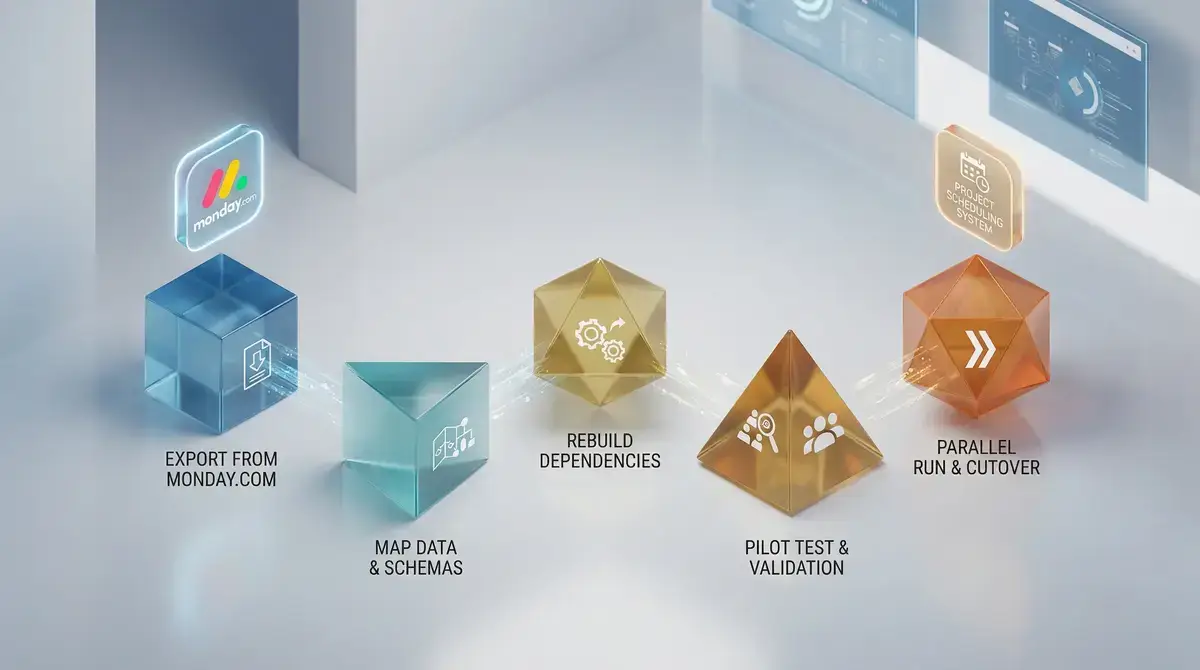
A structured migration takes four to six weeks and follows five phases: export, map, rebuild dependencies, pilot test, then parallel-run before full cutover.
The biggest mistake teams make isn't choosing the wrong tool. It's rushing the switch. Exporting your Monday.com boards to CSV or Excel takes minutes, but the real work starts when you try to recreate dependency chains and custom field logic in a new environment.
Follow these steps in order to protect your project timelines during the transition:
- Export everything as CSV or Excel. Monday.com lets you export board data per view, but automations and integrations don't come with it. Screenshot your automation recipes before exporting so you can rebuild the logic manually.
- Map columns to your new tool's field types. Monday.com's "Status," "Timeline," and "Dependency" columns rarely translate 1:1. Spend time matching each column to the closest equivalent, and flag any fields that need workarounds.
- Rebuild dependency chains from scratch. CSV exports flatten relationships into plain text. You'll need to manually re-link predecessor and successor tasks, which is tedious but non-negotiable for accurate scheduling.
- Run a pilot project first. Pick your most schedule-dependent project (the one with the tightest deadlines and most task interdependencies) and migrate that single project completely. If the new tool handles your hardest scheduling challenge, everything simpler will transfer without friction.
- Operate both tools in parallel for two to four weeks. Track the same deliverables in both systems on your pilot project. This overlap catches data gaps and gives your team time to adjust without risking missed deadlines.
Three pitfalls catch teams off guard during this process. Custom automations vanish entirely during export, and rebuilding them in a different tool's logic framework can take longer than the initial setup did. Notification rules tied to status changes need to be recreated manually. And any dashboards pulling cross-board data will break immediately on export, requiring a full rebuild in the new environment.
For teams managing active client projects during the migration window, running both tools in parallel isn't optional. It's the only way to avoid a gap in visibility that clients or stakeholders will notice.
Start Scheduling With the Right Tool
If your team has hit the ceiling on monday.com's scheduling capabilities, the right alternative depends on one question: does your work require dependency logic and critical path analysis, or just better task visibility? Use the interactive comparison of project management alternatives to filter by the scheduling criteria that match your team's actual complexity.
Related Articles


Ready to Improve Your Project Management?
Try YAPL free for 14 days and put these insights into practice.
Start Free Trial